For landscaping, lawn-care and tree-service crews — one truck or fifty
The weekly route on the crew’s phones. The brush run on the job it came from. Keep your estimating software. This covers the trucks, the trailer and the crew.
A route that repeats itself, crews clocking in at the job, dump tickets photographed against the job, and a pre-trip that includes the trailer. Built by a hauling company — the morning is the same.
$12 per truck a month. Free for 7 days on every truck — no card.
Try it free for 7 days — no card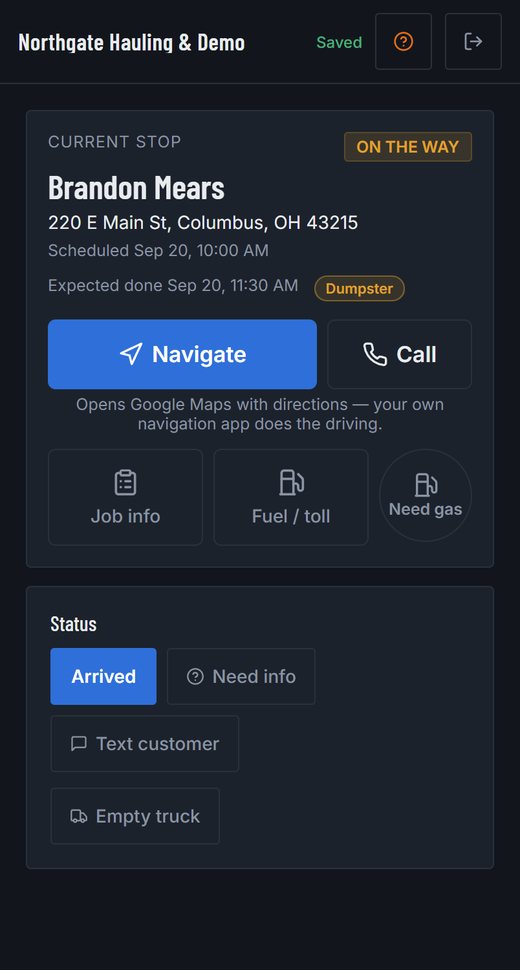
What replaces the whiteboard and the Friday texts
The route, every week, without re-typing it
Set a job to repeat weekly, every two weeks or monthly and it lands on the board and the driver’s phone for the next two weeks, then keeps coming. Each stop is its own job: skip one, move one, add a note to one, and the rest are untouched.
The day’s stops, in order, on the crew’s phones
Address, the notes you typed, Navigate and Call. The crew lead marks arrived and done; everyone on the job sees it and can navigate to it.
Crew hours from a time clock
Clock in and out at the job. Hours per person, labor cost on each shift, every corrected punch on record — instead of adding up texts.
Brush, stump and debris runs against the job
The transfer-station ticket is photographed at the gate. When one dump run carries three jobs’ brush, the fee is split across them. A yard that pays for firewood or chips is the same receipt the other way round.
A photo pre-trip before the first stop
Four corner photos, the odometer and a defect checklist. A severe defect keeps the truck off jobs until it’s resolved or you override it with a note. If the trailer puts you over 10,001 lb, this is the record DOT asks for.
A route is one crew’s day
Fourteen lawns are one route, not fourteen jobs. Push the day to Wednesday for rain, hand it to another crew, reorder it — as a block. The crew lead sees “Stop 3 of 14” and the next stop goes on the way by itself; a stop they can’t do is skipped with a reason.
What went down, logged at the stop
Pesticide with the EPA number and the applicator’s licence, fertilizer, salt, plow passes — with the weather. Pick the product from your list; export the state record or a storm’s file as a CSV.
Mowers, chippers and trailers as equipment (Pro)
Each piece listed with a status and where it is. Put a machine on the job that moves it and completing the job updates its location.
Spanish on the crew’s phones
Each person picks their language in Settings. The day’s stops, the status buttons, quick texts and the receipt form read in Spanish; the office screens stay English.
A page the customer can open
The “on my way” text carries a link: the company, the address, on the way → arrived → done with times, and the photos once it’s finished. No price, no phone number on it.
Cash or a check at the door, on the job
The office records what was taken — cash, check, card — and the job reads paid, part paid or unpaid. Reports show what was collected and what is still owed.
Day one, in three steps
- Add a truck — a name is enough. Invite the crew leads by email; they can set the phone to Spanish.
- Put Tuesday’s first stop on the board with the crew on it and set it to repeat weekly. The next two weeks appear.
- Open “See the driver’s phone”. That’s the 6 AM text, replaced. Add the transfer station under Disposal sites.
What it doesn’t do for landscapers — so you know before you start
- It isn’t a landscaping CRM: no estimates or proposals. Keep the one you use for those; a request form with your logo takes the customer’s work order, and the invoice for a job or a client’s month is made and sent from here. (The office can record a payment a customer made against a job.)
- It doesn’t track chemicals, applications or licences. The notes on a job are where that goes today.
- It isn’t an ELD and doesn’t keep hours-of-service logs. The time clock is for payroll hours.
- It doesn’t count season visits or bill by the visit — the route and its stops are on the board; the count is yours to read off the reports.
- It needs a signal for photos and receipts: a photo taken with no service uploads when the phone gets one. A status tap made with no signal is kept on the phone and sent when there is one.
Free tools, no signup
- What an hour of your crew really costs
- Split one dump ticket across the jobs that filled the truck
- USDOT and CDL weight check · your state’s rule for in-state trucks
Guides for landscaping & tree service
- Interstate or Intrastate? GVWR or GCWR? The Four Definitions Every Other Rule Depends On
- Does Your Junk Removal, Hauling, or Demolition Business Need a USDOT Number?
- Do My Drivers Need a CDL? The 26,001-Pound Line, and What Still Applies Below It
- Required Emergency Equipment on a Commercial Truck: Fire Extinguisher and Warning Triangles
- Keeping a Crew, in Numbers: Turnover, Lifting Injuries, Heat and What the Evidence Says Helps
Pricing
Every new company gets 7 days of Pro on all its trucks — no card — and the 7 days start when you add your first truck, not when you sign up. After that you pay per truck for the ones you keep; a truck that isn't paid for locks, and its records stay.
Standard — $12 per truck a month, or $9 billed annually
The core of the app, priced per truck.
- No charge per job, driver or dispatcher seat — you pay per truck
- Inspections, defects, grounding and the per-truck records PDF
- Dispatch board, calendar and the driver app
- Time clock, hours and labor cost (owner)
- Receipts, dump logs and route suggestions to disposal sites
- Service reminders, document expiry and the daily digest
Pro — $24 per truck a month, or $19 billed annually
Everything in Standard, plus:
- Live truck map with route lines and today's jobs pinned
- Job profitability and accounting reports, with CSV export
- A price-flag log: every flagged price, who settled it and why
- Labor cost visible to dispatchers, if you switch it on
- Equipment tracking: dumpsters, containers and machinery
- Unlocks the Instant Photo Quotes add-on
Questions
Do we even fall under DOT?
Often yes, and often without knowing it: a pickup pulling a loaded equipment trailer commonly exceeds 10,001 lb combined, which is where the federal rules start for commercial use, and states add their own. Our guides cover the thresholds. Whether or not you do, the pre-trip is the record you want the morning a brake line lets go.
How does a weekly route work?
Put the first stop on the board with a date, set it to repeat weekly, and it makes the next two weeks now and the rest nightly. Each occurrence is a normal job. Stop the series any time; what’s already on the board stays until you cancel it.
What does it cost a four-truck crew?
Standard is $12 per truck a month, so $48 a month for four trucks, with every crew member’s login included. Pro is $24 per truck and adds the live map, reports and equipment tracking. The first 7 days are free on up to 3 trucks with no card, and they start when you add your first truck. For comparison, per-seat dispatch software runs about $200 to $330 a month for a five-truck, eight-person company on the published prices we read in September 2026 — the seat fees are the price.