For roll-off and dumpster companies — one truck or fifty
Know where your cans are. Put the day’s stops on the driver’s phone. No whiteboard. No 6 AM text.
On Pro, every container has a tag, a status and the address it’s sitting at. Drivers see today’s stops in order and photograph the landfill ticket against the job.
Container tracking is on Pro: $24 per truck a month — five trucks is $120. Free for 7 days on every truck — no card.
Try it free for 7 days — no card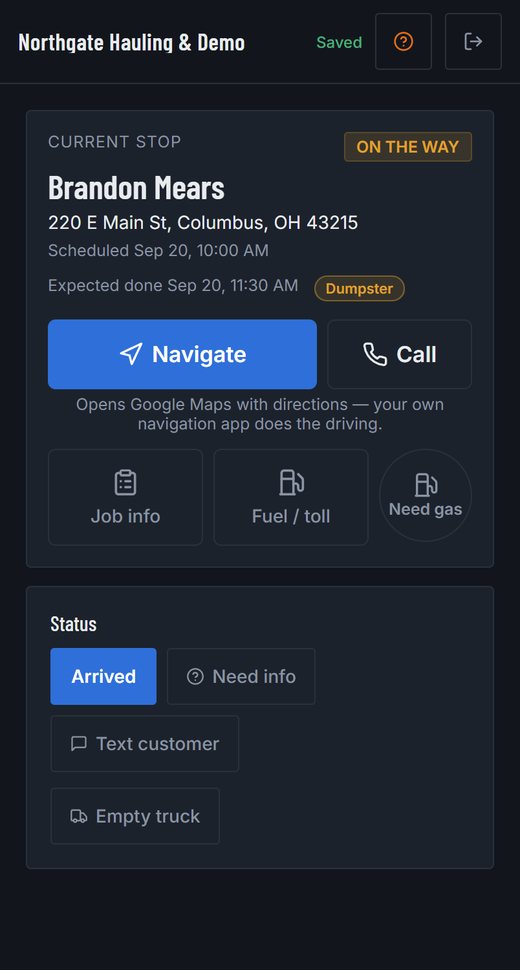
What replaces the whiteboard
Every can: a tag, a status, an address (Pro)
Each container is listed with its name or tag, whether it’s available, out on a job or in for repair, and the address it’s sitting at. Put the can on the delivery job and completing it puts the can at that address; put it on the pickup and it comes home — so “where’s the 20-yarder?” is answered by the driver’s stop.
The day’s stops, in order, on the driver’s phone
Deliveries, swaps and pickups as stops with the address, your notes, and Navigate and Call buttons. The driver marks each one done and the office sees it.
Landfill tickets photographed against the job
The scale ticket is photographed at the gate and kept with the job it belongs to. A scrap yard that paid is the same receipt the other way round, so a job’s disposal cost nets what the metal brought in.
A photo pre-trip before the first stop
Four corner photos, the odometer and a defect checklist from the driver’s phone. A severe defect keeps the truck off jobs until it’s resolved or you override it with a note.
A live map of your trucks (Pro)
Every truck with a live location and a route line to its next stop.
Crew hours from a time clock
Clock-ins, breaks and hours per driver, with labor cost on each shift.
Spanish on the crew’s phones
Each person picks their language in Settings. The day’s stops, the status buttons, quick texts and the receipt form read in Spanish; the office screens stay English.
A page the customer can open
The “on my way” text carries a link: the company, the address, on the way → arrived → done with times, and the photos once it’s finished. No price, no phone number on it.
Cash or a check at the door, on the job
The office records what was taken — cash, check, card — and the job reads paid, part paid or unpaid. Reports show what was collected and what is still owed.
Day one, in three steps
- Add a truck and, on Pro, your containers with their tags. Invite a driver.
- Put tomorrow’s delivery on the board with the container on it, set to leave at the address.
- Complete it from the driver’s phone and watch the container move to that address.
What it doesn’t do for roll-off — so you know before you start
- It doesn’t run rental billing — no daily rental clock. A customer can order a can through a request form with your logo, and the office turns it into a job. An invoice for a job or a client’s month is made and sent from here, and the payment they make is recorded against the job.
- A container rides on the job that moves it — delivered and left, or picked up and brought back — and completing that job is what updates where the can is. Swaps are two jobs, or one job and a note.
- Container tracking and the live map are on Pro ($24 per truck a month). Dispatch, pre-trips, receipts and the time clock are on Standard ($12).
Free tools, no signup
- What an hour of your crew really costs
- Split one dump ticket across the jobs that filled the truck
- USDOT and CDL weight check · your state’s rule for in-state trucks
Guides for roll-off & dumpsters
- Securing a Load of Junk or Debris: What the Federal Rule Requires, and the 50-Mile Check
- Lettering Your Truck: How the USDOT Number Has to Be Displayed
- The Pre-Trip Inspection, Item by Item: What the Driver Checks and What You Have to Keep
- Roadside Inspections in Numbers: How Often Trucks Get Parked, and for What
- Dump Fees and Diversion in Numbers: What Disposal Costs, Where It’s Rising, and What Never Needed to Go to the Landfill
Pricing
Every new company gets 7 days of Pro on all its trucks — no card — and the 7 days start when you add your first truck, not when you sign up. After that you pay per truck for the ones you keep; a truck that isn't paid for locks, and its records stay.
Standard — $12 per truck a month, or $9 billed annually
The core of the app, priced per truck.
- No charge per job, driver or dispatcher seat — you pay per truck
- Inspections, defects, grounding and the per-truck records PDF
- Dispatch board, calendar and the driver app
- Time clock, hours and labor cost (owner)
- Receipts, dump logs and route suggestions to disposal sites
- Service reminders, document expiry and the daily digest
Pro — $24 per truck a month, or $19 billed annually
Everything in Standard, plus:
- Live truck map with route lines and today's jobs pinned
- Job profitability and accounting reports, with CSV export
- A price-flag log: every flagged price, who settled it and why
- Labor cost visible to dispatchers, if you switch it on
- Equipment tracking: dumpsters, containers and machinery
- Unlocks the Instant Photo Quotes add-on
Questions
What does it cost a five-truck roll-off company?
With container tracking you need Pro: $24 per truck a month, so $120 a month for five trucks, with every driver and dispatcher included. Without it, Standard is $12 per truck. The first 7 days are free on up to 3 trucks with no card, and they start when you add your first truck. For comparison, per-seat dispatch software runs about $200 to $330 a month for a five-truck, eight-person company on the published prices we read in September 2026 — the seat fees are the price.
How many containers can I track?
There’s no per-container charge. You pay per truck.
Do my drivers need to install anything?
No. It runs in the browser on any phone. You invite each driver by email and they set their own login.